Order Types
Choose between immediate execution and price control
Every order specifies an outcome, side, quantity, and price. The order type controls whether you prioritize execution now or wait for a specific price.
Compare order types
| Market | Limit | |
|---|---|---|
| Execution | Immediately against available orders | Only at your price or better |
| Price control | Final average depends on book depth | You set the maximum buy or minimum sell price |
| Unfilled amount | Canceled according to FAK/FOK preference | Remains open until filled or canceled |
| Best for | Speed | Price control |
Market orders
A Market order trades against the best available prices. Large orders may fill across multiple price levels, so always review the estimate before signing.
In Settings → Trading, Kuest supports two execution preferences:
- FAK (Fill and Kill): fill the amount available now and cancel the remainder.
- FOK (Fill or Kill): fill the entire order immediately or cancel it entirely.
Limit orders
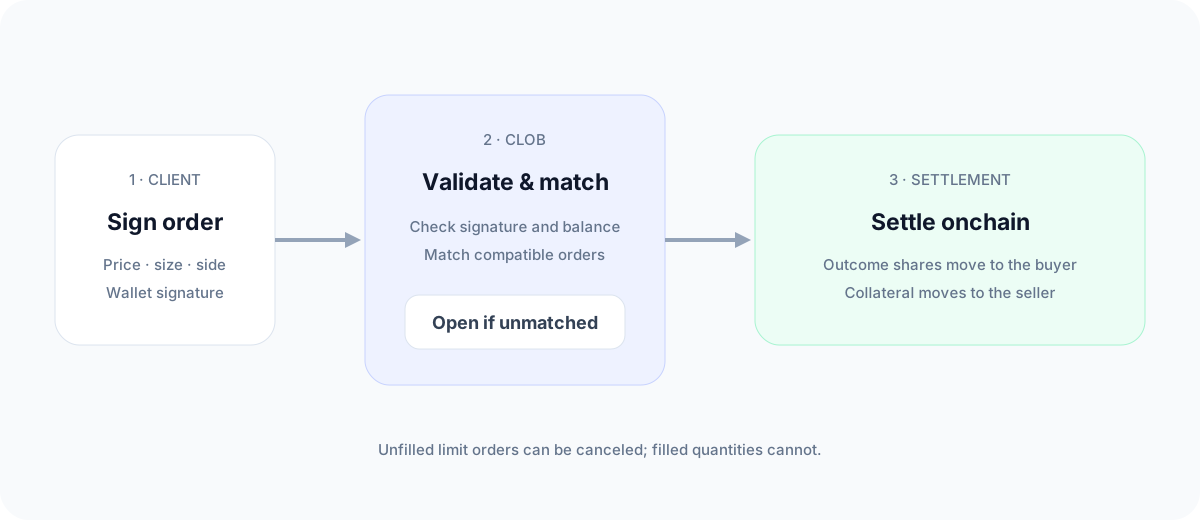
A Limit order fills only at your chosen price or better. It can fill partially as matching orders arrive. The remaining quantity stays in Portfolio → Open Orders until it fills or you cancel it.
A market-style order is submitted with execution constraints designed to trade immediately. It still depends on available order-book liquidity.
Temporary post-restart mode
After a matching-engine restart, a market may briefly enter a warmup period while market makers rebuild liquidity. During this period, regular new orders are temporarily unavailable, but you can still cancel open orders. Limit orders marked post-only can be submitted as long as they would rest on the order book instead of executing immediately.
The order form shows the approximate time remaining. Once the countdown ends, submit your order again.